
In this article discuss about the Hotpatch for Windows client machines.
Hotpatching is now supported for Windows 11 Enterprise, version 24H2, on x64-based systems (AMD/Intel). These updates allow organizations to strengthen their cybersecurity posture with minimal impact on end users, enabling faster deployment of critical fixes without the need for immediate reboots or interruptions.
Hotpatching:
Hotpatching is an advanced method that enables the operating system to receive critical security updates without needing a reboot. By focusing on essential patches, Microsoft can deliver smaller, more efficient updates that reduce disruption to users and systems.
I still recall the times when IT administrators had to walk a tightrope—installing vital security fixes while trying not to interrupt users’ workflow. With hotpatching, those days are fading, thanks to dramatically reduced reboot requirements and significantly improved system availability.
A bit of history: Microsoft first introduced hotpatching to ensure high availability and robust security on its Azure infrastructure and even Xbox servers—where uptime for gamers was a top priority. Today, this feature has made its way to Windows client machines, beginning with Windows 11 24H2 (Build 26100.2033 and later).
Key benefits of hotpatching for Windows client:
Hotpatching brings several key improvements to how Windows devices stay protected and updated:
Instant Defense: Updates are applied immediately upon installation, ensuring systems are quickly safeguarded against newly discovered threats.
Reliable Security Coverage: Hotpatches deliver the same comprehensive security as the regular Patch Tuesday updates issued each month, maintaining consistent protection.
Reduced Downtime: Users experience minimal disruption, as hotpatches install seamlessly in the background—typically without requiring a system reboot for the rest of the quarter. (Note: Some updates related to operating system features, firmware, or applications may still trigger a reboot.)
Hotpatch for Windows client operate on a quarterly cycle:
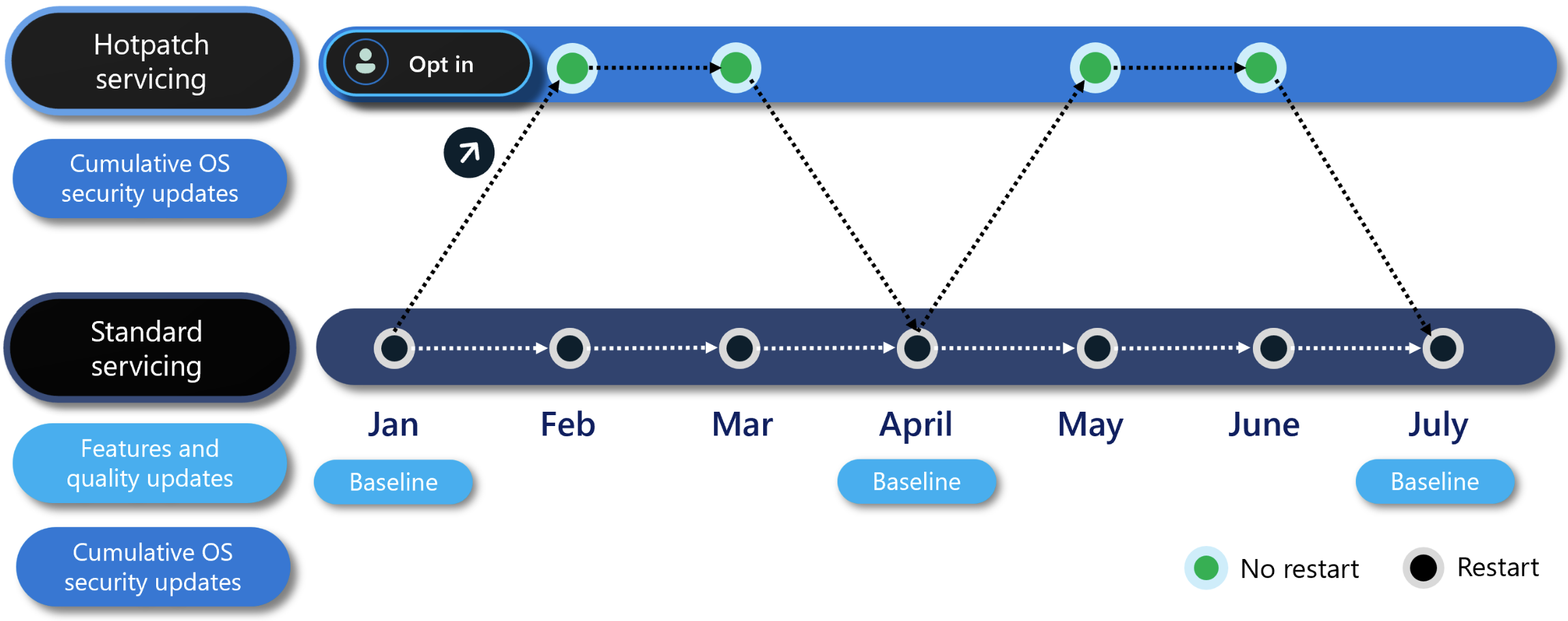
Hotpatch for Windows client
Baseline Months (January, April, July, October):
During these months, devices receive a comprehensive update that includes the latest security patches, newly released features, and various enhancements accumulated since the previous baseline. Machine restart is required after update is applied.
Following Two Months (Interim Updates):
In the two months after each baseline release, devices are updated with hotpatches that contain only critical security updates. These hotpatches are applied without requiring a reboot. Any new features or improvements missed during these months will be delivered in the next quarterly baseline update.
Conclusion:
This capability is presently in public preview and remains a work in progress, meaning it may not be fully finalized. Offered on a “Preview” basis, it enables users to try it out in live environments while contributing important feedback.
The feature enhances Windows 11 Enterprise update management by minimizing the frequency of system restarts without compromising security. This approach promotes a more seamless user experience by transitioning from reactive patching to proactive protection, resulting in smoother workflows, increased efficiency, and a more secure environment for users.